
Find commercial photography and video clients for your studio.
Choose the kind of shoot you deliver and the products you understand. Use Anivo to research suitable brands and prepare a product-specific introduction.
1,000 credits + 7 days full accessOn first app sign-in · Once per device · No card required
“Find furniture manufacturers in York selling own-brand extendable dining tables. We produce product photographs and short demonstration videos. Review their table ranges and listed locations.”
Brands to review against your portfolio and travel area, with specific products to discuss and questions about who plans their content.
For commercial photographers, videographers and small production studios selling defined shoots to businesses, with a relevant portfolio and a clear service area.
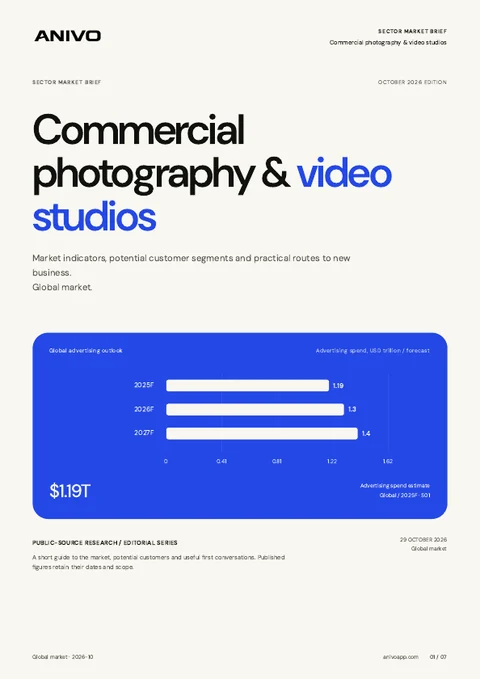
Global edition · October 2026
Get your sector’s market report.
Source-backed market indicators, potential customer segments and practical routes to new business.
A product range gives you a subject to discuss.
You can recognise a product that suits your work without knowing whether its owner plans a shoot. Anivo helps you research brands and keep your observations beside the conversation. Ask about the brief and buying process before planning production.
Broad company lists mix brand owners, retailers and businesses outside your shooting scope.
Public photographs reveal little about approved budgets, upcoming campaigns or existing production suppliers.
Product access, deliverables and approval requirements get lost when enquiries move between emails and proposals.
Turn a product observation into a shoot conversation.
A practical workflow for commercial photography & video studios.
Define the shoot and business type
Describe the products, photography or video service and locations you cover. Review Anivo’s research plan before starting the search.
Review the brand and its products
Check current product pages yourself. Confirm whether the business owns the brand or resells another company’s range, and record the relevant observations.
Establish who plans the production
Ask who owns the content brief and whether a shoot is planned. Keep the buyer’s answers and next action in CRM.
Prepare a relevant portfolio introduction
Draft a short message about one product category. Confirm the shot list, access, intended uses and approval process before proposing scope or dates.

A furniture brand with extendable dining tables
In this fictional example, your studio serves York furniture businesses. The manufacturer sells own-brand extendable tables, a product type covered by your photography and demonstration-video portfolio.
Why review this prospect?
- Its current product pages include extendable dining tables that relate to your portfolio.
- The company describes its own furniture brand, giving you a content owner to identify.
- The listed location is within your travel area; product availability and the actual shoot location remain to be confirmed.
What to verifyConfirm who commissions content and whether any shoot is planned. Discuss product access, shot list, stills and video deliverables, intended uses, budget and approvals. Product pages do not establish that current visuals are inadequate or that a project is available.
A clearer way to work the market.
Anivo keeps the reason for choosing a business connected to the next action you take.
Prospects matched to your portfolio
Choose businesses whose products and locations fit the production work you can deliver.
A concrete portfolio introduction
Refer to a product category you reviewed and offer a comparable example of your own work.
A brief you can return to
Keep the buyer’s requirements, approval questions and agreed next step beside the company record.
Use the parts that support the job.
- Research Agent
- Business research
- Qualification notes
- CRM
- Email drafts
- Inbox
Before you try the workflow.
Straight answers for commercial photography & video studios.
Can Anivo identify companies planning a photo or video shoot?
Use research to select relevant companies. Confirm plans, timing, budget and supplier selection directly with the content owner. Public product pages alone do not establish an available commission.
Will Anivo assess the quality of a company’s photos or videos?
Review the current material yourself and record observations relevant to your service. This workflow does not promise an automatic creative audit or a measure of how visuals affect sales.
What if a retailer uses images supplied by the manufacturer?
Ask who commissions and approves the content. Establish whether your prospective buyer controls the material and can provide product access before offering a shoot.
Can I manage production and deliver the files in Anivo?
Use Anivo for prospect research, early enquiries and sales follow-up. Manage production schedules, editing, asset review and delivery in your existing studio tools. Agree deliverables and intended uses with the buyer in your proposal process.
Continue your research.
Choose one shoot type and one product category.
Research brands that fit your work. Start with a relevant portfolio example and learn what the content owner is planning.
Continue with Googleor continue with email