
Find commercial furniture clients for your product range.
Choose the rooms and furniture your business serves. Use Anivo to research suitable premises and prepare a conversation about the buyer’s space and project plans.
1,000 credits + 7 days full accessOn first app sign-in · Once per device · No card required
“Find serviced office centres in Manchester that offer meeting rooms. We supply meeting tables and stacking chairs for business premises. Review their room descriptions and locations within our delivery area.”
Office centres to review against your furniture range, with room-use notes and questions about the purchasing owner, project plans and delivery requirements.
For suppliers furnishing business premises with defined furniture ranges, a delivery area and an established specification and quotation process.
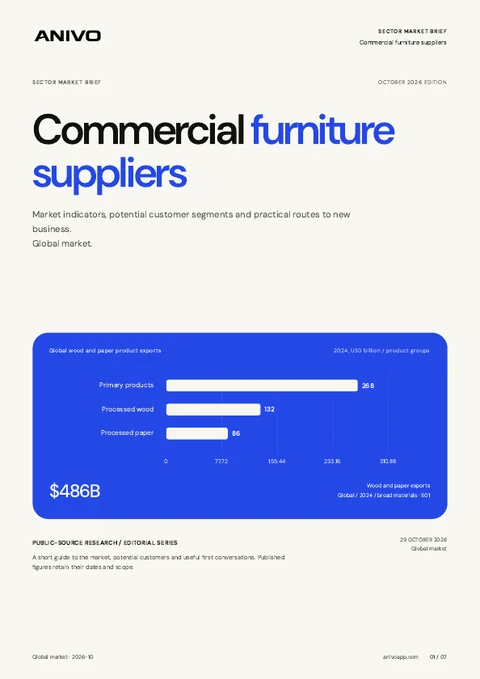
Global edition · October 2026
Get your sector’s market report.
Source-backed market indicators, potential customer segments and practical routes to new business.
A room listing starts the conversation about fit.
Research businesses with meeting rooms that could use your tables and seating. Keep room descriptions and buyer replies together in Anivo as you prepare a furniture proposal.
Broad company lists include premises and room types outside your furniture range.
Room photos and capacity claims do not establish a replacement project or order quantity.
Dimensions, finish choices and delivery access get lost between the first enquiry and the proposal.
Qualify the room before preparing the furniture proposal.
A practical workflow for commercial furniture suppliers.
Define the room and furniture range
Describe your products, the room use they serve and your delivery area. Review Anivo’s research plan before starting the search.
Review the premises and room descriptions
Check current company pages yourself. Record relevant room uses and keep unconfirmed dimensions or requirements as questions.
Confirm the project and purchasing owner
Ask whether a room project is planned and who selects the furniture. Keep the answers and agreed next action in CRM.
Prepare a focused specification conversation
Draft an introduction about the relevant room. Confirm dimensions, intended use, existing furniture, finish approvals and delivery access before quoting.

A serviced office centre with bookable meeting rooms
In this fictional example, you supply meeting tables and stacking chairs around Manchester. The centre describes bookable meeting rooms, but its furniture plans are not yet known.
Why review this prospect?
- The current room descriptions relate to the meeting furniture you supply.
- The listed premises are within your delivery area, subject to confirming the order destination.
- Your product range offers a specific table and seating conversation for the person responsible for the rooms.
What to verifyConfirm the project and who approves the purchase. For product selection, check room dimensions, use, quantities and furniture to retain. For the quote, agree finishes, budget and delivery access. Room photos do not establish replacement need.
A clearer way to work the market.
Anivo keeps the reason for choosing a business connected to the next action you take.
Premises relevant to your furniture range
Connect a room the business describes to a specific range you can supply.
Buyer-confirmed details for the specification
Keep room requirements and approval questions available before recommending products.
Delivery details saved with the enquiry
Record the project owner, site requirements and agreed next action on the company record.
Use the parts that support the job.
- Research Agent
- Business research
- Qualification notes
- CRM
- Email drafts
- Inbox
Before you try the workflow.
Straight answers for commercial furniture suppliers.
Can Anivo identify businesses replacing their furniture?
Anivo helps you research premises for your range. Confirm furniture plans with the person who approves purchases.
Can I use room capacity to estimate an order?
Get the intended use, dimensions and required quantities from the buyer. Review the existing furniture and layout through your specification process. Published capacity alone does not determine what should be supplied.
What if an interior designer or landlord selects the furniture?
Ask who specifies, purchases and approves the items. Record those responsibilities before preparing product options or agreeing delivery.
Does Anivo design room layouts or manage furniture orders?
Use Anivo for company research, enquiry notes and sales follow-up. Keep space planning, product specification, stock checks and delivery coordination in your existing furniture systems.
Continue your research.
Start with one room type and one furniture range.
Research suitable premises, find the purchasing owner and establish the room requirements before preparing your proposal.
Continue with Googleor continue with email